Install MOD Broadcast Encoder on your Mac

Download for Apple Silicon Macs

Download for Intel Macs

Not sure? Click the Apple menu, then About This Mac. If it says Chip: Apple M1 (or M2, M3, M4...), choose Apple Silicon. If it says Processor: Intel, choose Intel. Almost all Macs from 2021 onwards are Apple Silicon.

  1. Click the right download button above.
  2. Open the file that downloads (MOD-Broadcast-Encoder-Mac-...dmg, in your Downloads folder).
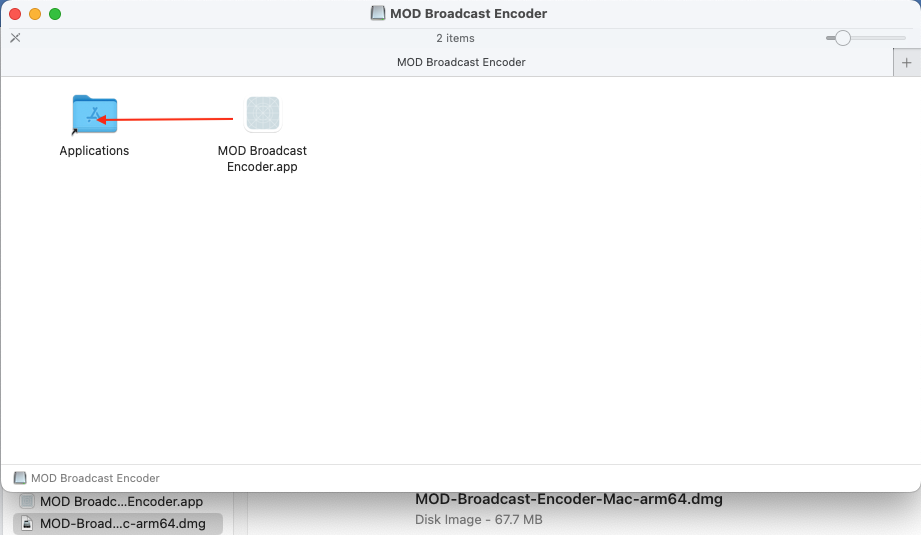
  3. Drag MOD Broadcast Encoder onto the Applications folder in the window that opens, then open it from Applications (see image).

Dragging MOD Broadcast Encoder onto the Applications folder

That's it. The Terminal line below picks the right version for you automatically.

Prefer one step? Use Terminal instead

  1. Press Cmd + Space, type Terminal and press Enter.
  2. Copy this line, paste it into the Terminal window (Cmd + V) and press Enter:
    curl -fsSL https://download.mediaondemand.net/encoder/mac/install.sh | bash
  3. Wait about a minute. The Encoder opens by itself. You can close Terminal.

Next time, open it from your Applications folder like any other app.

If macOS asks to use the microphone, click OK. If it asks about the keychain, click Always Allow. To update, run the same line again.